Talking to a cheap smart band without the vendor’s app — just C++ and raw Bluetooth packets.
Table of Contents
- Background — Why Bother?
- What DaFitDesktop Does
- Architecture Overview
- The MOYOUNG V2 BLE Protocol
- Scanning for Devices
- Connecting and Reading GATT Services
- Sending Commands and Parsing Responses
- The Terminal Dashboard
- Reading the SQLite Database (Offline Mode)
- Building the Project
- Takeaways
1. Background — Why Bother?
Budget smart bands from brands like Marv Neo, MOYOUNG, CRREPA, and dozens of other white-label fitness trackers all funnel your health data through a single mobile app — Da Fit. The app works, but it’s a black box: your step counts, heart rate readings, and sleep data are locked inside a proprietary ecosystem with no export, no API, and no desktop client.
DaFitDesktop was born out of curiosity: what if you could just talk to the band directly from a Windows PC?
The result is essentially a miniature feature replica of the Android Da Fit app — rebuilt from scratch in C++ for the Windows terminal. It speaks the same BLE protocol, requests the same health metrics (steps, distance, calories, heart rate, SpO2, sleep), and displays the same data the phone app does — but without the phone, without the cloud, and without the black-box APK.
Here’s what the official Da Fit Android app shows for the same band on the same day:
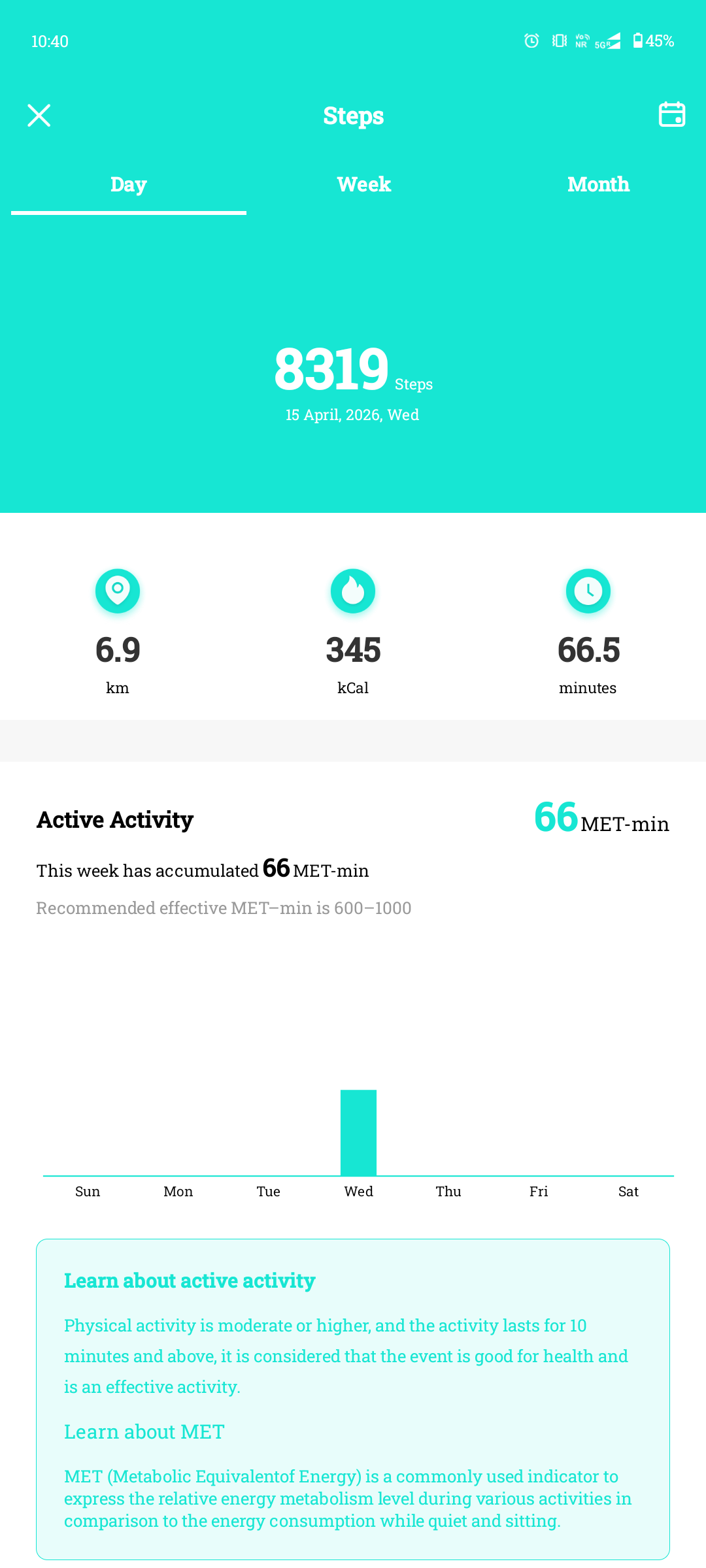
And here’s what DaFitDesktop produces from the same band, connected directly over BLE from a Windows PC:
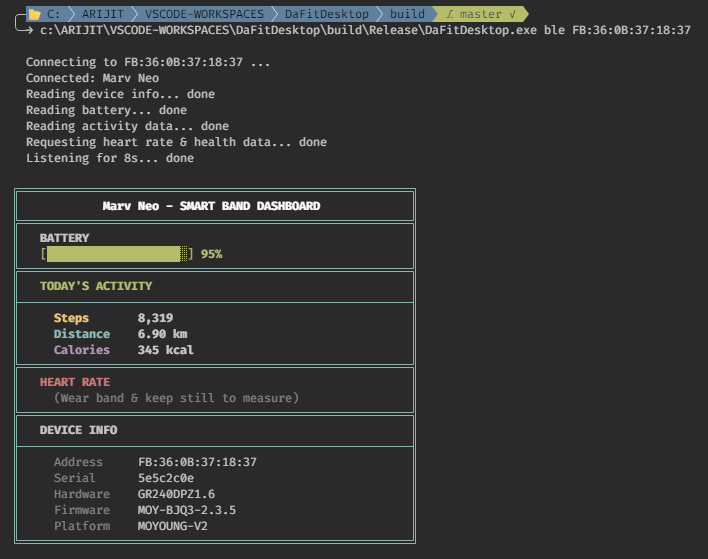
Same band, same data, same protocol — just ~1,500 lines of C++20 instead of a 50 MB Android app. The tool:
- Scans for nearby Bluetooth LE devices.
- Connects to a Da Fit–compatible smart band over GATT.
- Reverse-engineers the MOYOUNG V2 protocol to request health data.
- Renders a beautiful terminal dashboard using ANSI colors and Unicode box-drawing.
- Can also read a Da Fit SQLite database pulled from an Android device via ADB.
2. What DaFitDesktop Does
The tool provides four operating modes, each accessible from a single executable:
| Mode | Command | Purpose |
|---|---|---|
| BLE Scan | DaFitDesktop scan | Discover nearby BLE devices and their MAC addresses |
| BLE Dashboard | DaFitDesktop ble <address> | Connect, fetch health data, render a formatted dashboard |
| BLE Raw Stream | DaFitDesktop ble-raw <address> | Stream every raw hex packet for protocol analysis |
| DB Reader | DaFitDesktop db <path.db> | Parse a Da Fit SQLite database pulled via ADB |
The BLE Dashboard mode is the flagship. It automates the entire connection flow:
- Establishes a BLE connection to the band.
- Reads standard GATT services — Device Information (serial, hardware revision, firmware, manufacturer) and Battery Service (battery level percentage).
- Reads the proprietary MOYOUNG activity snapshot from characteristic
0xFEE1(steps, distance, calories). - Sends MOYOUNG V2 protocol commands via characteristic
0xFEE2requesting heart rate, SpO2, and sleep data. - Subscribes to notification characteristics (
0xFEE1,0xFEE3, and the standard Heart Rate0x2A37) and listens for responses. - Renders all collected data in a box-drawn terminal dashboard with color-coded sections.
3. Architecture Overview
The project is structured as a clean CMake-based C++20 application with conditional compilation for its two subsystems:
DaFitDesktop/
├── CMakeLists.txt            # Build configuration with feature toggles
├── include/
│   ├── BleScanner.h          # BLE scanning + GATT connection API
│   ├── DaFitProtocol.h       # Protocol constants, packet parser, data structs
│   └── DbReader.h            # SQLite database reader interface
├── src/
│   ├── main.cpp              # CLI entry point, ANSI dashboard renderer
│   ├── BleScanner.cpp        # WinRT-based BLE implementation
│   ├── DaFitProtocol.cpp     # Binary packet parser
│   └── DbReader.cpp          # SQLite query logic
└── third_party/
    └── sqlite3.c / sqlite3.h # Bundled SQLite amalgamation (optional)
Two CMake options control what gets built:
| Option | Default | Effect |
|---|---|---|
DAFIT_ENABLE_BLE | ON | Compiles BLE scanning and GATT connection code (requires Windows SDK) |
DAFIT_ENABLE_SQLITE | ON | Compiles the SQLite database reader |
This means you can build a BLE-only version on a machine without SQLite, or an offline DB-reader-only version without the Windows BLE SDK — all from the same codebase.
Key Technology Choices
- C++20 with
std::optional,std::format, and structured bindings. - C++/WinRT for zero-overhead access to the Windows Bluetooth LE APIs (
Windows.Devices.Bluetooth.*). - SQLite amalgamation (
sqlite3.c) bundled inthird_party/for zero-dependency database reading. - ANSI escape sequences and UTF-8 box-drawing characters for the terminal UI — no external TUI library needed.
4. The MOYOUNG V2 BLE Protocol
This is the interesting part. Through community reverse-engineering and packet sniffing, the MOYOUNG V2 protocol used by Da Fit–compatible bands follows a clear pattern:
GATT Service Layout
| Service UUID | Purpose |
|---|---|
0x1800 | Generic Access (device name) |
0x180A | Device Information (serial, HW/FW revisions, manufacturer) |
0x180F | Battery Service (battery level %) |
0x180D | Standard BLE Heart Rate (some bands expose this) |
0xFEEA | MOYOUNG Custom Data Service — the core of the protocol |
0xFEE7 | MOYOUNG Status Service (keep-alive / real-time heartbeat) |
Characteristics Inside 0xFEEA
| Characteristic UUID | Direction | Role |
|---|---|---|
0xFEE1 | Read/Notify | Activity snapshot (steps, distance, calories) |
0xFEE2 | Write | Send request commands to the band |
0xFEE3 | Notify | Receive response packets from the band |
Packet Formats
Command (phone → band):
AB 00 04 00 <cmd> 00 FFWhere <cmd> is one of:
0x01— Device info0x04— Battery0x09— Step data0x0A— Heart rate0x0B— Blood oxygen (SpO2)0x10— Sleep data
Response (band → phone):
FE EA <type> <subtype> <value...>Or the older format:
5A <cmd> <payload...>Where <cmd> maps to the same command IDs. For example, a heart rate response of 72 BPM:
5A 0A 48And a step count response with 8,319 steps, 6,900 meters, and 345 kcal:
5A 01 00 00 20 7F 00 1A F4 00 01 59The project’s DaFitProtocol.h defines these as a clean enum:
enum class Command : uint8_t {
    StepCount   = 0x01,
    Distance    = 0x02,
    Calories    = 0x03,
    HeartRate   = 0x0A,
    BloodOxygen = 0x0B,
    SleepData   = 0x10,
    Battery     = 0x20,
    Unknown     = 0xFF
};
5. Scanning for Devices
The scan mode uses the BluetoothLEAdvertisementWatcher from WinRT to passively listen for BLE advertisement packets for 10 seconds:
BluetoothLEAdvertisementWatcher watcher;
watcher.ScanningMode(BluetoothLEScanningMode::Active);

watcher.Received([&](auto const&, auto const& args) {
    DiscoveredDevice dev;
    dev.address    = args.BluetoothAddress();
    dev.addressStr = FormatAddress(dev.address);
    dev.rssi       = args.RawSignalStrengthInDBm();
    dev.name       = WideToUtf8(args.Advertisement().LocalName());
    // ... deduplicate and store
});

watcher.Start();
std::this_thread::sleep_for(std::chrono::seconds(10));
watcher.Stop();
The output looks like:
╔══════════════════════════════════════════════════════════╗
║                  BLE DEVICE SCANNER                      ║
╚══════════════════════════════════════════════════════════╝

  [FB:36:0B:37:18:37]  RSSI=-52  Marv Neo
  [C4:29:A1:0D:88:12]  RSSI=-71  Mi Band 5

  To connect:
  DaFitDesktop ble FB:36:0B:37:18:37
Important: The band must be disconnected from the Da Fit phone app first. BLE only allows one active connection at a time.
6. Connecting and Reading GATT Services
Once you have the MAC address, the FetchBandInfo() function orchestrates the full connection flow. It’s essentially an automated GATT client:
Step 1 — Establish connection:
auto device = BluetoothLEDevice::FromBluetoothAddressAsync(deviceAddress).get();Step 2 — Read Device Information Service (0x180A):
The code reads four standard characteristics — Serial Number (0x2A25), Hardware Revision (0x2A27), Firmware Revision (0x2A28), and Manufacturer Name (0x2A29) — using a reusable helper:
info.serial       = ReadCharAsString(device, SVC_DEVICE_INFO, CHR_SERIAL);
info.hardware     = ReadCharAsString(device, SVC_DEVICE_INFO, CHR_HW_REV);
info.firmware     = ReadCharAsString(device, SVC_DEVICE_INFO, CHR_FW_REV);
info.manufacturer = ReadCharAsString(device, SVC_DEVICE_INFO, CHR_MANUFACTURER);
Step 3 — Read Battery Level (0x180F):
auto battBytes = ReadCharAsBytes(device, SVC_BATTERY, CHR_BATTERY_LEVEL);
if (!battBytes.empty())
    info.batteryPercent = battBytes[0];
Step 4 — Read Activity Snapshot (0xFEE1):
The MOYOUNG activity characteristic stores today’s totals as three little-endian 3-byte integers:
auto actBytes = ReadCharAsBytes(device, SVC_MOYOUNG_DATA, CHR_MOY_ACTIVITY);
if (actBytes.size() >= 9) {
    info.steps        = actBytes[0] | (actBytes[1] << 8) | (actBytes[2] << 16);
    info.distanceM    = actBytes[3] | (actBytes[4] << 8) | (actBytes[5] << 16);
    info.caloriesKcal = actBytes[6] | (actBytes[7] << 8) | (actBytes[8] << 16);
}
7. Sending Commands and Parsing Responses
After reading the static GATT values, the tool sends MOYOUNG V2 request commands to 0xFEE2 and listens for notification responses on 0xFEE3:
std::vector<std::vector<uint8_t>> cmds = {
    { 0xAB, 0x00, 0x04, 0x00, 0x04, 0x00, 0xFF },  // battery
    { 0xAB, 0x00, 0x04, 0x00, 0x09, 0x00, 0xFF },  // steps
    { 0xAB, 0x00, 0x04, 0x00, 0x0A, 0x00, 0xFF },  // heart rate
    { 0xAB, 0x00, 0x04, 0x00, 0x0B, 0x00, 0xFF },  // blood oxygen
    { 0xAB, 0x00, 0x04, 0x00, 0x10, 0x00, 0xFF },  // sleep
};

for (auto& cmd : cmds) {
    WriteToChar(device, SVC_MOYOUNG_DATA, CHR_MOY_WRITE, cmd);
    std::this_thread::sleep_for(std::chrono::milliseconds(300));
}
Each command follows the AB 00 04 00 <cmd> 00 FF pattern. Responses arrive asynchronously via the ValueChanged callback on the notification characteristic:
c.ValueChanged([&info](auto const& sender, auto const& args) {
    auto bytes = BufferToBytes(args.CharacteristicValue());

    // Parse MOYOUNG response: FE EA <type> <subtype> <value>
    if (bytes.size() >= 4 && bytes[0] == 0xFE && bytes[1] == 0xEA) {
        uint8_t sub = bytes[3];
        if (sub == 0x05 || sub == 0x06)
            info.heartRateBpm = bytes[4];
        else if (sub == 0x07)
            info.spO2Percent = bytes[4];
    }
});
The ParsePacket() function in DaFitProtocol.cpp provides a cleaner, structured parser that handles both the 0x5A legacy format and the standard Bluetooth SIG Heart Rate Measurement format:
ParsedPacket ParsePacket(const std::vector<uint8_t>& data) {
    ParsedPacket pkt;
    if (data[0] == HEADER_BAND_TO_PHONE && data.size() >= 3) {
        pkt.command = static_cast<Command>(data[1]);
        switch (pkt.command) {
        case Command::HeartRate:
            // 5A 0A <bpm>
            hr.bpm = data[2];
            break;
        case Command::StepCount:
            // 5A 01 <step3> <step2> <step1> <step0> [dist] [cal]
            // ... decode big-endian fields
            break;
        // ...
        }
    }
    return pkt;
}
8. The Terminal Dashboard
The dashboard is rendered entirely with ANSI escape codes and UTF-8 box-drawing characters — no ncurses, no external TUI library. This is one of the most satisfying parts of the project.
The rendering uses double-line box-drawing characters (╔, ═, ╗, ║, ╚, ╝) and single-line separators (─, ╟, ╢) to create distinct sections:
 c:\ARIJIT\VSCODE-WORKSPACES\DaFitDesktop\build\Release\DaFitDesktop.exe ble FB:36:0B:37:18:37

  Connecting to FB:36:0B:37:18:37 ...
  Connected: Marv Neo
  Reading device info... done
  Reading battery... done
  Reading activity data... done
  Requesting heart rate & health data... done
  Listening for 8s... done

╔════════════════════════════════════════════════════════╗
║            Marv Neo - SMART BAND DASHBOARD             ║
╠════════════════════════════════════════════════════════╣
║   BATTERY                                              ║
║   [███████████████████░] 95%                           ║
╠════════════════════════════════════════════════════════╣
║   TODAY'S ACTIVITY                                     ║
╟────────────────────────────────────────────────────────╢
║     Steps       8,319                                  ║
║     Distance    6.90 km                                ║
║     Calories    345 kcal                               ║
╠════════════════════════════════════════════════════════╣
║   HEART RATE                                           ║
║     (Wear band & keep still to measure)                ║
╠════════════════════════════════════════════════════════╣
║   DEVICE INFO                                          ║
╟────────────────────────────────────────────────────────╢
║     Address     FB:36:0B:37:18:37                      ║
║     Serial      5e5c2c0e                               ║
║     Hardware    GR240DPZ1.6                            ║
║     Firmware    MOY-BJQ3-2.3.5                         ║
║     Platform    MOYOUNG-V2                             ║
╚════════════════════════════════════════════════════════╝
A few implementation details worth noting:
Battery bar rendering
The battery percentage is visualized as a 20-block progress bar using Unicode full-block (█) and light-shade (░) characters, color-coded green/yellow/red based on charge level:
static std::string BatteryBar(int percent) {
    int filled = percent / 5;  // 20 blocks max
    int empty  = 20 - filled;
    const char* barColor = (percent > 50) ? Color::Green
                         : (percent > 20) ? Color::Yellow
                         : Color::Red;
    // ... build bar string with ████░░░░
}
Visible-length calculation
Because ANSI escape codes are invisible zero-width sequences, padding strings to a fixed column width requires counting only visible characters. The VisibleLength() function skips escape sequences and counts multi-byte UTF-8 code points as single display columns:
static int VisibleLength(const std::string& s) {
    int len = 0;
    bool inEsc = false;
    for (auto it = s.begin(); it != s.end(); ) {
        uint8_t ch = *it;
        if (ch == 0x1B) { inEsc = true; ++it; continue; }
        if (inEsc) { if (ch == 'm') inEsc = false; ++it; continue; }
        // Count one column per code point
        if (ch < 0x80) { len++; ++it; }
        else if (ch < 0xE0) { len++; it += 2; }
        else if (ch < 0xF0) { len++; it += 3; }
        else { len++; it += 4; }
    }
    return len;
}
Windows console setup
On Windows, virtual terminal processing and UTF-8 output must be explicitly enabled:
static void EnableAnsiColors() {
    HANDLE hOut = GetStdHandle(STD_OUTPUT_HANDLE);
    DWORD mode = 0;
    GetConsoleMode(hOut, &mode);
    SetConsoleMode(hOut, mode | ENABLE_VIRTUAL_TERMINAL_PROCESSING);
    SetConsoleOutputCP(CP_UTF8);
}
9. Reading the SQLite Database (Offline Mode)
Not everyone wants to pair via BLE. If you have root access or can use ADB to pull the Da Fit app’s database from an Android device, the db mode can read it directly:
# Pull the database from the phone
adb pull /data/data/com.crrepa.band.dafit/databases/dafit.db .

# Read it
.\DaFitDesktop.exe db dafit.db
The DbReader.cpp module tries multiple known table schemas (Da Fit has changed its schema across versions):
const char* queries[] = {
    "SELECT date, step_count, distance, calories FROM step_data ORDER BY date;",
    "SELECT date, steps, distance, calories FROM daily_activity ORDER BY date;",
    "SELECT date, step_count, distance_meters, calories_kcal FROM steps ORDER BY date;",
};

for (auto sql : queries) {
    // Try each query until one returns data
    if (sqlite3_prepare_v2(db, sql, -1, &stmt, nullptr) != SQLITE_OK)
        continue;
    // ... read rows
    if (!records.empty()) break;
}
This pattern of graceful schema fallback means the tool works across multiple Da Fit database versions without user configuration.
The same approach is used for heart rate (heart_rate_data, heart_rate, hr_data) and sleep records (sleep_data, sleep).
10. Building the Project
Prerequisites
| Requirement | Details |
|---|---|
| OS | Windows 10 or 11 with a Bluetooth LE adapter |
| Compiler | Visual Studio 2022 — “Desktop development with C++” workload |
| Windows SDK | 10.0.17763+ (for C++/WinRT headers) |
| CMake | 3.20+ |
Build Steps
git clone https://github.com/arklnd/DaFitDesktop.git
cd DaFitDesktop
mkdir build && cd build
cmake .. -G "Visual Studio 17 2022"
cmake --build . --config Release
The binary lands at build\Release\DaFitDesktop.exe.
To disable a subsystem:
cmake .. -DDAFIT_ENABLE_BLE=OFF        # No Bluetooth
cmake .. -DDAFIT_ENABLE_SQLITE=OFF     # No SQLite
11. Takeaways
Building DaFitDesktop surfaced some interesting lessons:
-
BLE is surprisingly accessible on Windows. C++/WinRT provides a clean, modern API for Bluetooth LE that doesn’t require any third-party libraries. The
BluetoothLEDevice,GattCharacteristic, andBluetoothLEAdvertisementWatcherclasses are well-designed and async-friendly. -
Proprietary protocols are often simpler than expected. The MOYOUNG V2 protocol boils down to a 7-byte command packet and structured response payloads. Once you identify the header bytes (
0xABfor commands,0x5A/0xFEEAfor responses), the rest is straightforward binary parsing. -
ANSI art is underrated. A few hundred lines of box-drawing logic can produce genuinely attractive terminal output without pulling in a full TUI framework. The key is getting
VisibleLength()right so padding accounts for escape sequences and multi-byte UTF-8. -
Schema flexibility pays off. Da Fit changes its SQLite schema across app versions. Trying multiple known queries in a fallback chain is a simple, robust pattern for dealing with that.
-
Raw packet logging is invaluable. The
ble-rawmode saved enormous amounts of time during reverse engineering. Being able to see every hex byte the band sends — timestamped and logged to a file — made protocol analysis tractable.
The project is a compact example of what you can accomplish with modern C++ and the Windows platform APIs: direct hardware access, binary protocol parsing, and a polished terminal UI — all in around 1,500 lines of code and zero external dependencies (beyond the optional SQLite amalgamation).
The full source code is on GitHub, Feel free to fork it, hack on it, and have fun — whether you want to add new protocol commands, support a different band, or just poke around at raw BLE packets from your own wrist.